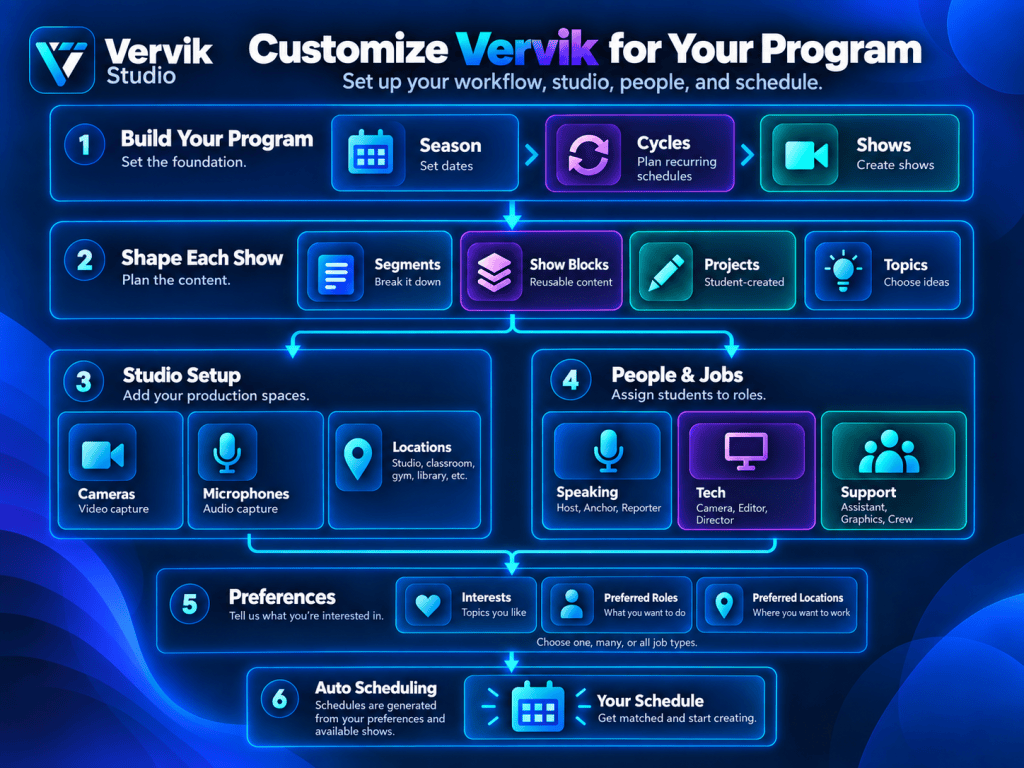
Vervik Studio is designed to adapt to the way each school or production program actually works. Begin by building the program structure, starting with a season, dividing that season into recurring cycles, and then creating the individual shows that will be produced.
Each show can be organized into segments, with those segments filled by reusable show blocks or original projects. Projects can also be tied to available topics, giving students clear ideas and choices for what they want to create.
Vervik also lets each program customize the production environment itself. Schools can define the cameras, microphones, and locations they use, whether production happens in a dedicated studio, classroom, hallway, gym, library, or another location. This makes the system flexible enough to support both traditional broadcast studios and programs that produce content throughout the school.
Broadcast jobs are organized into three broad categories: Speaking, Tech, and Support.
Speaking roles cover on-camera and voice responsibilities such as hosts, anchors, reporters, weather, and sports.
Tech roles handle the production side of the show, including cameras, graphics, teleprompter, floor direction, and technical direction.
Support roles help prepare content, assist production, and keep the team organized behind the scenes.
Each user can choose the types of jobs they are interested in doing. They can select one category, several categories, or all of them, along with preferred roles, topics, and locations. Vervik then uses those preferences when generating schedules, matching people with available jobs and upcoming shows.
The result is a system that can be customized around the structure of the program, the equipment and spaces available, and the interests of the people participating.

