Today Dashboard
Start with a clear view of the current production day. See the next show, rundown readiness, assigned work, upcoming responsibilities, and anything that still needs attention.
Project Center
Keep every story, segment, recurring feature, and production project organized in one place. Users can see what they are responsible for, air dates, project status, and related production information.
Custom Project Types
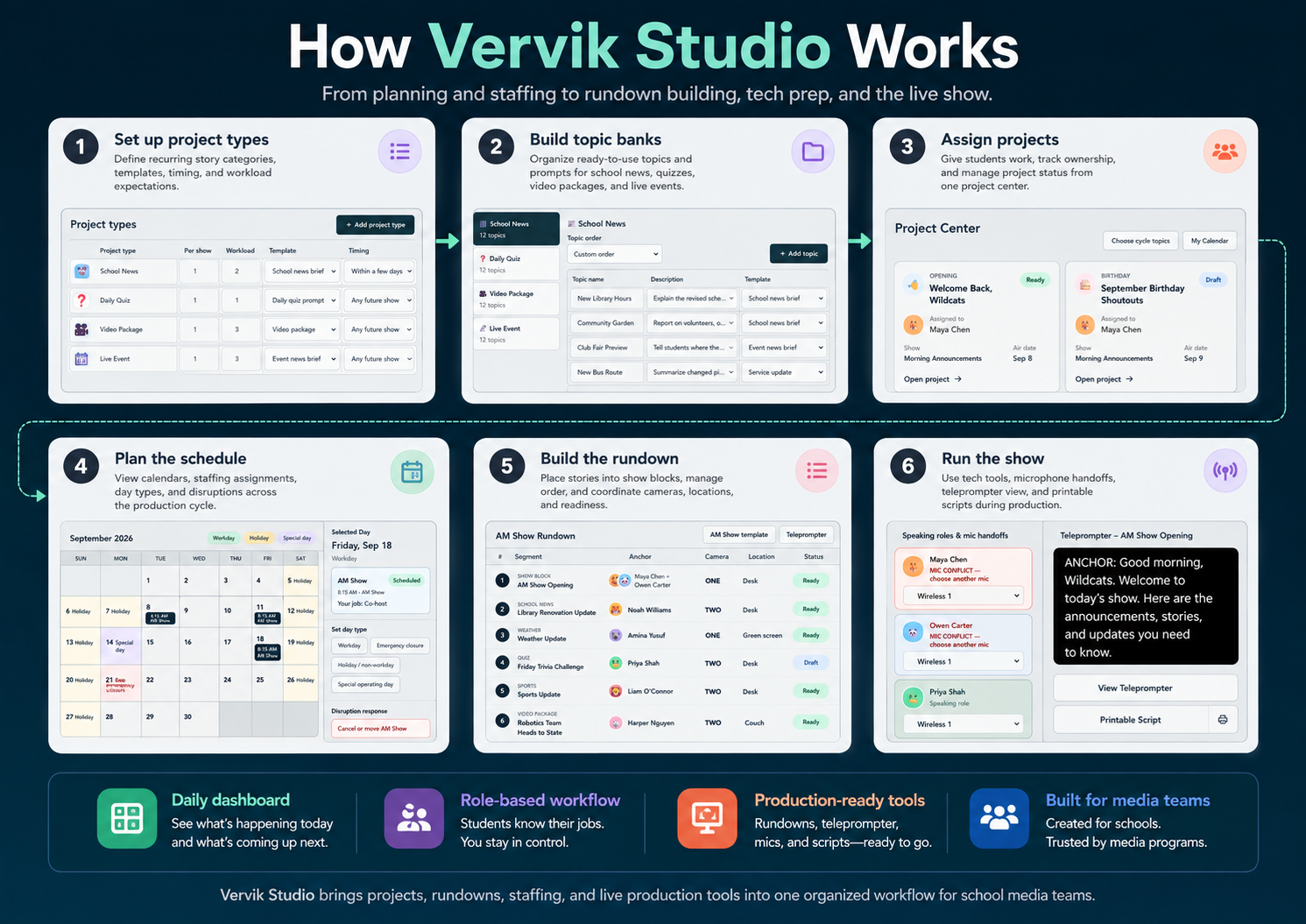
Define the kinds of work your program actually produces, such as School News, Daily Quiz, Video Package, Live Event, or your own categories. Each type can have its own workload, timing, template, icon, and number of projects needed per show.
Topic Banks
Build reusable banks of story ideas and assignment prompts for each project type. Topics can include descriptions, templates, icons, and custom ordering so users have meaningful choices without starting from scratch.
Show Rundown Builder
Assemble each production in broadcast order using reusable show blocks and assigned projects. See anchors, cameras, locations, status, and other production details directly in the rundown.
Quickly see projects that have not yet been placed into a show. Move ready work into the rundown while keeping postponed, reusable, or early projects organized for later.
Scripts & Project Workspaces
Give each project its own workspace for writing and preparing content. Scripts stay connected to the project and ultimately flow into the show rundown and teleprompter.
Teleprompter
Turn the completed rundown into a large, production-ready teleprompter view. Scripts are presented in show order with speaker, camera or input, location, and segment information available when needed.
Printable Show Script
Generate a clean print-oriented version of the show for anchors, directors, advisors, or backup use during a production.
Scheduling & Calendar
See shows across day, week, and month views while managing the production calendar. Workdays, holidays, emergency closures, special operating days, and recurring shows can all be reflected in the schedule.
Schedule Disruption Management
When the normal calendar changes, Vervik Studio helps manage what happens to the affected show and its projects. Cancel work, preserve reusable projects, or move eligible content instead of rebuilding the schedule manually.
Production Staffing
Assign hosts, co-hosts, anchors, weather, sports, announcements, teleprompter operators, audio, graphics, floor directors, technical directors, assistants, and other positions your program uses.
Full Staffing Schedule
View assignments across multiple shows by job or by person. This makes it easier to understand rotations, identify workload issues, and see exactly who is responsible for each production role.
Speaking Roles & Anchor Assignments
Connect the people appearing on camera directly to the segments they are presenting. Segments can support multiple anchors when the production requires it.
Tech Center
Prepare the technical side of the show alongside the editorial side. Coordinate cameras, inputs, locations, speaking roles, microphones, and other production details before going live.
Microphone Planning & Handoffs
Assign available microphones to speakers and identify conflicts before the show starts. Vervik Studio can distinguish planned microphone handoffs from situations where simultaneous speakers have accidentally been assigned the same microphone.
Cameras, Inputs & Locations
Configure the equipment and production locations available to your organization. Projects and show blocks can carry requested or assigned camera, input, and location information into the rundown.
Show Templates & Reusable Blocks
Build the recurring structure of a production once and reuse it. Openings, weather, sports, announcements, closings, and other repeating elements can remain consistent while projects change from show to show.
Seasons & Production Cycles
Organize planning into seasons instead of allowing years of production data to become one endless schedule. A new season can begin from the structure of the previous one while starting a fresh production cycle.
People & Permissions
Manage the people participating in the program and control what different users can access or change. Administrators and power users can manage the overall operation while contributors work within their assigned areas.
Personalized User Views
Users do not have to navigate the entire administrative system. Their projects, jobs, schedule, and responsibilities are presented around the work that applies specifically to them.
Status & Readiness Tracking
Clearly distinguish work that is not started, in draft, ready, or still needs attention. Rundown-level readiness gives the production team a quick indication of whether the show is prepared to air.
Organization Customization
Configure Vervik Studio around your program instead of forcing every organization into the same setup. Show structure, project types, topics, production positions, cameras, locations, templates, terminology, and visual identity can all reflect the organization.
Responsive Web Interface
Vervik Studio is designed to work across desktop, laptop, tablet, and smaller screens, with complex production tables and tools adapting appropriately instead of simply shrinking a desktop interface.
Optional Advanced Capabilities
Expand Vervik Studio when your program needs more. Advanced capabilities can include assessment and approval workflows, teams and gamification add-ons, automated scheduling, AI assistance, and deeper integrations with Google Workspace products without making the core product unnecessarily complicated.
From Assignment to Airtime
Vervik Studio keeps the entire production connected. Plan projects, organize topics, schedule shows, assign the crew, build the rundown, prepare microphones and cameras, write scripts, and run the teleprompter from one coordinated workspace built specifically for media-production teams.

